Securing the UI Supply Chain
Any UI project can come at this phase if no dependencies strategy present for it. Node dependency resolution algorithm allows having multiple dependencies of the same library in the same application. This is a great flexibulity, but can backfire with increased bundle size for UI...
Related concepts: Cache Storage in UI , Do Not Use Mocks in Your Tests , Building a Lithuanian Law Assistant with LLM and RAG (part 1) , Why Radix UI Is So Popular? .
Phase 1: UI Dependencies is a Mess
Any UI project can come at this phase if no dependencies strategy present for it. Node dependency resolution algorithm allows having multiple dependencies of the same library in the same application. This is a great flexibulity, but can backfire with increased bundle size for UI applications. Another issues is security vulnerabilities present in duplicated libraries. These issues are multiplied if for the same task multiple librariesa re used.
The biggest risk to most enterprise applications is it’s complexity. A bloated dependency tree with multiple versions of the same library is a source for unpatched vulnerabilities. You cannot patch a security hole if you don't even know which version of the library is actually running in production.
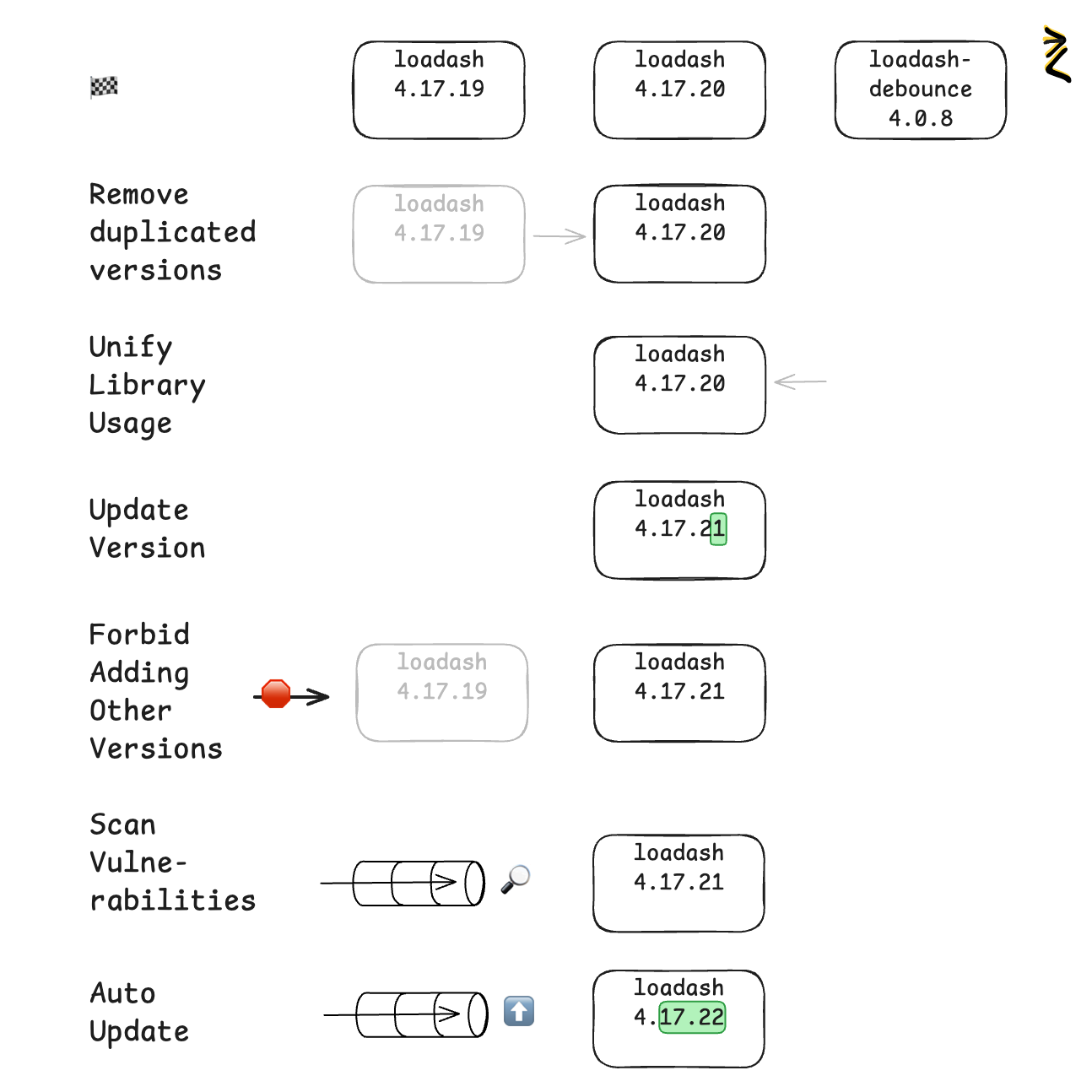
This diagram outlines the workflow I use to regain control over a chaotic dependency tree, using lodash as the classic example.
Phase 2: Remove Duplications
It is common to find three different versions of lodash and a standalone lodash-debounce in one project. This inflates bundle size and triples the attack surface.
The Fix:
Audit: Identify the multiple versions of the same library.
Dedupe: Remove duplicated library versions, and use the latest define one. At this step do not use dependency “pinning” features of package managers like pnpm.overrides or yarn.resolutions.
Phase 3: Unify Library Usage
For the same task we may use multiple libraries. Each library may have transitive dependencies. All this caues load on your CI, performance and increases security attack vector. To fix this need to audit libraries used and group those by the same task. Dedupe libraries in the group and leave one per usage group. For example lodash and lodash-debounce must be deduped and only lodash must be left.
Phase 4: Update Version
At this step we need to find latest “safe” version for the lodash library, to get latest bugfixes and security patches.
Phase 5: Forbid Adding Other Versions
This is critical step, which will prevent dependency decalrations, degrading to the Phase 1. In order to prevent degrading, we need to setup dependencies whitelist, capturing this state. Pipeline must match used dependencies against the whitelist. The process of adding a new dependency is controlled through the whitelist. You need to add library to the whitelist first, then it can be used. This “proactive” way of adding dependencies allows to evaluate the nescesity for the library, check versions and present vulnerabilities with the complete dependency tree. Oposed to “reactive” approach, when library is added, and then you need to review the impact of new library.
Phase 6: Scan Vulnerabilities
Security is a continuous process, not a one-time fix. Integrate vulnerability scanners (Snyk, SonarQube, npm audit) into every pull request. At this step you will reduce the noise-to-signal ratio with a minimal set of dependencies used in the project. Use this data to capture the currect state and report vulnerabilities to the project task tracker system.
- Auto-Update: Use tools like Renovate or Dependabot to automate the patch cycle (4.17.21 → 4.17.22).
Phase 7: Auto Update
Use tools like Renovate or Dependabot to automate the patch cycle. If you are usign pnpm or npm use command pnpm audit --fix to fix your vulnerabilities. At this step pnm may add pinning versions for security reason using pnpm.overrides mechanism. This is a correct usage of this feature of package manager. Integrate updating your dependncies with your CI lifecycle. Merge new dependencies only when Commit Gating succeeded. This approach allows safe and automatic remediation from security vulnerabilities.
Conclusion
Projects can become messy when they use many versions of the same libraries, which creates bigger bundles and hidden security issues. Cleaning this up means removing duplicates, picking one library per task, and keeping everything updated. After that, a small allowed-list and regular security checks help keep the dependencies under control.